
CV Screener
AI CV screening for Arabic and English CVs
AI invoice scanner for Arabic and English invoices
Arabic-first AI invoice management: from photo to approval, with zero manual data entry.
In most companies an invoice sleeps in a pocket or a drawer until month-end, when a stack of paper lands on the accountant's desk to be typed in by hand. The result is lost time, human error, duplicate and forged invoices slipping through unnoticed, and no record of who submitted what. Global tools mostly cannot read an Arabic invoice at all.
Timed with the e-invoicing expansion in Saudi Arabia and mandatory JoFotara in Jordan. Every paper invoice in the region now has to become clean digital data.
I built two of the three layers: the entire AI extraction engine in n8n, and the complete frontend. The frontend is three role-based applications (admin, accountant, and employee) sharing one React 19 and TypeScript codebase, with an Arabic-default bilingual UI, full RTL through logical CSS properties, and a custom i18n layer. It includes a guided upload flow with in-page camera capture, a receipt browser with server-side filtering, Excel export, and feature gating across subscription tiers, all shipped through GitHub Actions quality gates and atomic SSH deploys.
AI/automation engine and complete frontend. Laravel backend by a teammate.
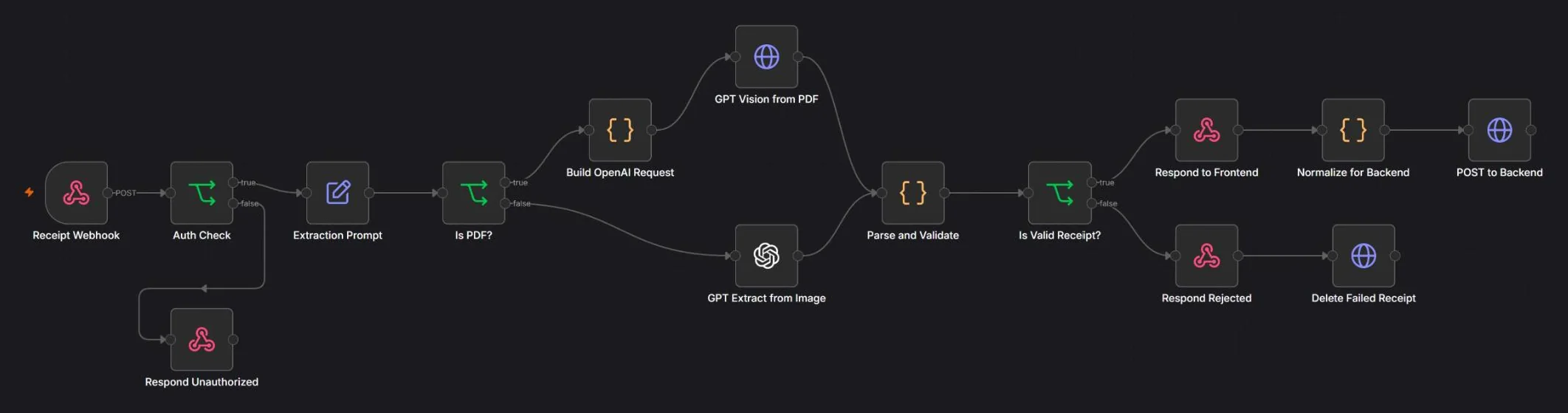
The extraction pipeline behind Smart Scanner. Every invoice, whether a photo or a PDF, is verified as a real invoice, parsed with GPT-4.1 Vision, validated, deduplicated, and persisted. It reads Arabic, English, and mixed documents, and is tuned for handwritten Arabic invoices and Saudi e-invoice fields.
The steps are listed in the order the graph reaches them, so where the diagram splits, its branches follow one another in the list. A step that ends in a question mark is a fork: a run takes a single branch after it, as the diagram shows.
Invoice upload Webhook
Secret header check
PDF or image?
Read the PDF OpenAI
Read the image OpenAI
Parse and validate
Valid invoice?
Reply to app Webhook
Reject and clean up
Post to backend
The diagram is drawn from the real node graph, with names simplified and nothing sensitive in it.
Manual invoice entry disappears entirely; a photo becomes structured accounting data in about ten seconds.
AI CV screening for Arabic and English CVs
A whole website into an Excel file
Card scanner that saves to contacts
Gives an AI model real data to query
B2B lead generation for Saudi Arabia and Jordan
For a website, send me your LinkedIn profile, your company's current site or your shop's Google Maps listing. For automation, describe the work your team repeats by hand. I will tell you what I would build.