
Smart Scanner
AI invoice scanner for Arabic and English invoices
A whole website into an Excel file
One link in, the whole site out: every page discovered, the data classified, and an Excel file with a tab for each kind of data.
Collecting data from websites usually means copying it by hand into Excel, or writing a new scraper for every site, which breaks the moment a site blocks bots or renders its content with JavaScript.
You paste one link. The engine discovers every page of the site through its sitemap, classifies what it finds (companies, people, products, articles, jobs, places) and fills an Excel file with a tab per category, mirrored to Google Sheets. It runs in the background on n8n, so it keeps going after the laptop is closed, and the rows collected so far can be downloaded at any moment; large sites are split into parts. Each page fetch escalates only as far as it needs, from a direct request to a proxy pool, a scraping API, and finally a full renderer. Extraction reads JSON-LD and tables first, falling back to chunked, parallel AI extraction. A small web interface shows live progress, a time estimate, a preview of the rows, and pause, resume, cancel, and restart controls.
Full build: interface and automation
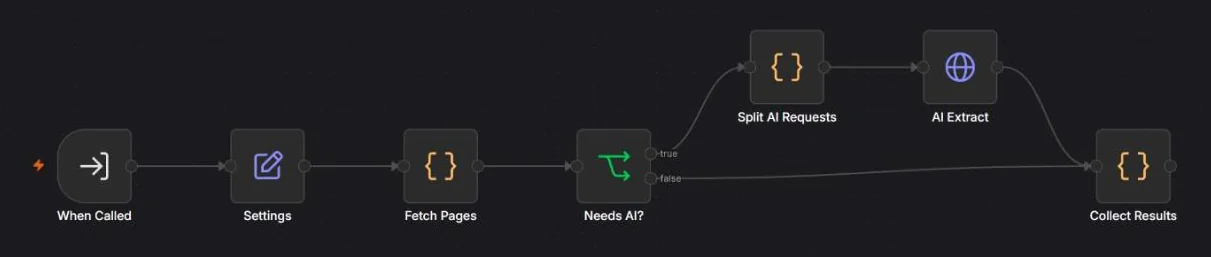
A shared engine fetches pages and escalates only as far as it must, reads structured data before it spends anything on AI, and writes the rows into a spreadsheet. Quick jobs and long crawls run as separate, controllable workers.
The steps are listed in the order the graph reaches them, so where the diagram splits, its branches follow one another in the list. A step that ends in a question mark is a fork: a run takes a single branch after it, as the diagram shows.
Scrape job API Webhook
Crawl worker tick
Plan the job
Quick batch loop
Escalating fetch Engine
Needs AI?
AI field extraction OpenAI
Collect rows
Dedupe and merge
Excel and Sheets Google Sheets
The diagram is drawn from the real node graph, with names simplified and nothing sensitive in it.
Collecting a website into Excel stops being copy-and-paste or a new script per site.
AI invoice scanner for Arabic and English invoices
AI CV screening for Arabic and English CVs
Card scanner that saves to contacts
Gives an AI model real data to query
B2B lead generation for Saudi Arabia and Jordan
For a website, send me your LinkedIn profile, your company's current site or your shop's Google Maps listing. For automation, describe the work your team repeats by hand. I will tell you what I would build.